Introduction
Reinforcement learning for coding agents, in their native harnesses
Lego-RL is an open-source framework for reinforcement learning of coding agents using their native agent harnesses.
What is Lego-RL?
Training a coding agent with reinforcement learning is hard to do well. A single rollout runs for hundreds of model calls against a real repository before a test suite says whether it worked, and the harness driving it — Claude Code, OpenHands, OpenCode — rewrites its own prompts and history along the way. Most RL frameworks answer that by reimplementing the harness against a rollout interface: the trajectory becomes trainable, but it is no longer the trajectory the agent would have produced. Sandbox failures, verifier misconfiguration and reward hacking then corrupt what survives.
Lego-RL trains the agent inside its own harness. It runs the harness unmodified and observes it at the model API, so the tokens the trainer updates on are the tokens the policy emitted. You point a config at a task index and a checkpoint, validate it before any GPU is committed, launch it, and watch the run in a live UI.
A run is one loop. The agent works a real repository task inside a sandbox, an in-process proxy captures every token it generates, the task's own test suite scores the result, and the trainer turns the scored trajectories into a gradient step.
Supporting a new harness is a thin adapter that launches the agent, points it at the inference service and returns the interaction data. The rest of the pipeline is shared.
OpenHands SDK, Claude Code and OpenCode are validated end to end. You can add any harness speaking the OpenAI or Anthropic API as a custom adapter; see Compatibility for the full matrix, including what is inherited from upstream but never exercised here. Motivation explains why the harness is part of the optimization problem.
Highlights
-
Faithful optimization: token ids, masks and log-probabilities are captured at generation time inside the serving path, so a harness that rewrites its own history cannot desynchronize the trainer from what the model emitted. On sparse policies, rollout-time expert routing is replayed during the update; our reference runs hold the rollout–training probability correlation above 0.99.
-
Reliable execution: tasks run and are verified in scalable Docker or Kubernetes sandboxes, with image caching and stage-wise defenses against reward hacking. Each task's own test suite produces the reward, and trials whose environment failed are dropped from the loss instead of being scored as model failures.
-
Observable training: a run is validated before any GPU is committed, driven through agent-plugin skills that report rather than mutate, and diagnosed from metrics, termination causes and full agent trajectories in a live UI, not from a loss curve alone.
Architecture
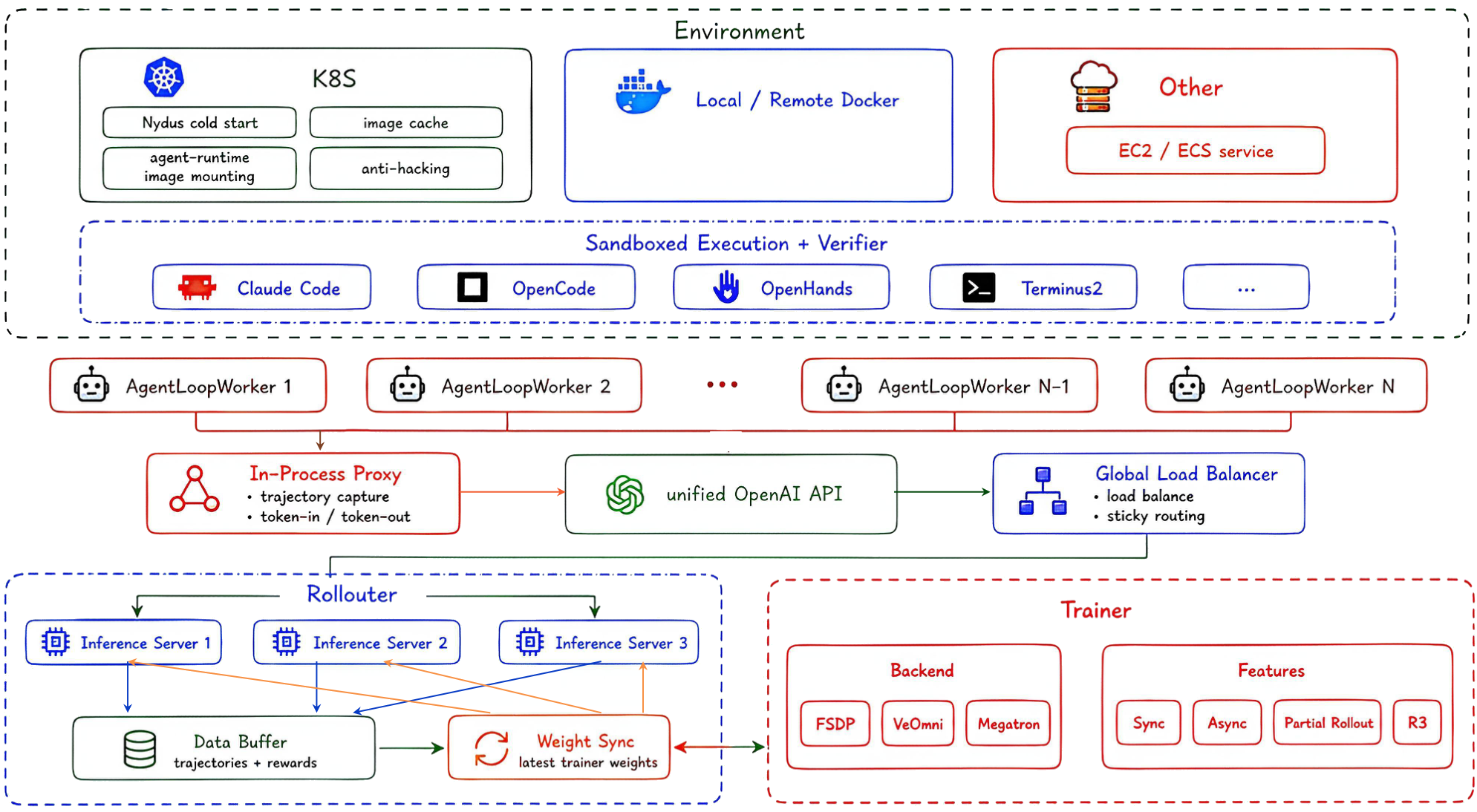
Reading the framework diagram top to bottom:
| Layer | What it does |
|---|---|
| Environment | Kubernetes, Docker or remote sandboxes run each trial and its verifier, with image caching and anti-hacking defenses |
| Agent loop workers | one worker per trial drives an unmodified harness — Claude Code, OpenHands, OpenCode, Terminus — to completion |
| In-process proxy | sits on the harness's model API, serving a unified OpenAI endpoint while recording exact token ids, masks and log-probabilities |
| Global load balancer | spreads sessions across inference replicas with sticky routing, so a session's KV cache is not thrown away between turns |
| Rollouter | vLLM replicas, the trajectory buffer, and weight sync from the trainer |
| Trainer | verl actor on FSDP / VeOmni / Megatron; PPO, GRPO or GSPO; sync, async, partial rollout and routing replay |
The task set that feeds this is built once, offline, and the whole loop — data preparation, validation, run, live UI, human review — is one closed cycle. Architecture walks each component; Running the Pipeline walks your path through it.
Start by Use Case
| I want to… | Go to |
|---|---|
| Understand why this exists | Motivation |
| Install it | Installation |
| Launch a small real run | Demo Run |
| Run the whole thing, in order | Running the Pipeline |
| Train a model | Training |
| Evaluate a checkpoint | Evaluation |
| Prepare a task set | Data Preparation |
| Add an agent or a backend | Contributing |
| Diagnose a failed run | Failure Playbook |
| Configure a run | Configuration |
| Look up a variable | Configuration Reference |
| Get unstuck on setup | Setup FAQ |